No 1 browser "IE9" is going to hit the web on 14th march

IE9 hits new height of success this year since launch
Gaming with HTML5: Enjoy the new era of web
Internet Explorer 9 Platform Preview 7 released.
WebKit SunSpider results can be seen here:
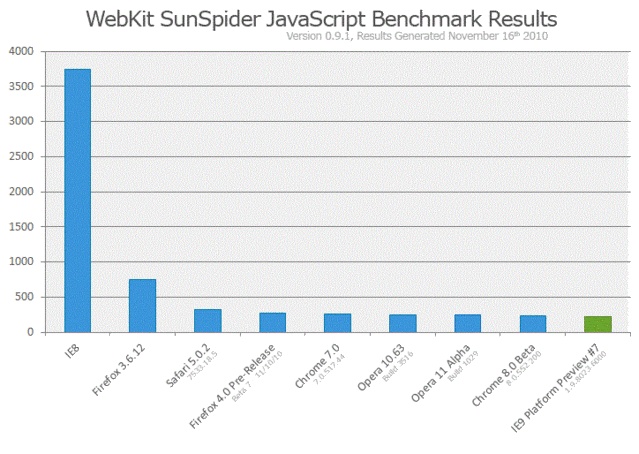
Improvement and performance gain of platform preview 7 is clear by seeing the video and the WebKit SunSpider results over JavaScript.
Important and related links for IE9 platform preview can be easily grabbed:
-> Download IE9 Beta
-> Test Drive IE9
-> For more details on the Twitter Live chat.
[Download] Top 4 downloads of this week.
1. New Microsoft Security Essentials 2.0.522.0 Beta : MSE is a Microsoft product in the category of free antivirus which is available to connect users from here. It is currently in beta with milestone 2.0 reached and development is still going on to reach to some final build. Now Microsoft Security Essential is at 2.0.522.0 and current users of it can upgrade to the latest build of it. The update can be grabbed via Windows Update feature by all Genuine Windows users all around the world.
2. Mozilla Firefox Beta 7: Mozilla Firefox is bringing all new features and new era of web experience into its coming betas. This time Firefox is ready with its 4.0 Beta 7 release which can be downloaded from here or if you want the latest stable release then go to Firefox 3.6.
3. Google Chrome beta 8.0.552.200 : Google chrome is a product of Google which is upgrading itself day by day with its all new HTML 5, CSS 3 etc features with improved web experience. This time after entering into Beta 8.0 again received and update on 11th. It can be grabbed from here as beta 8.0.552.200 and for latest stable release click here.
4. Internet Explorer 9 Platform Preview 6: Microsoft is bringing the new web experience like CSS3 2D transform, HTML 5, more Graphics, more speed , improved browsing experience with IE 9. You can Test Drive Internet Explorer Developer Platform at IE9TEstDrive and can see its amazing web experience with full feel.
Test drive Internet Explorer 9

Speed up your slow connection using my tips.
Are you annoyed of Slow Dial-up Connections? Feeling frustrated during your request of Web page is taking time? It’s very time wasting in case of sending and receiving of mails and files. So here are some tips to follow and get rid of all problems, increase your browsing experience, productivity and speed.
1.Compress while sending multiple files.
In order to send more than one file via e-mail use compression utility like 7-Zip, WinZip, WinRar etc so that it takes less space in your and recipients mailbox.
2.Turn off graphics in IE.
Graphics enriches the Web Page looks but it too takes more time in loading so can be turned off for faster surfing. It can be disabled as follows:
•Open Internet Options either from Start Search (in Vista or Seven) or via Tools > Internet Options.
•Go to Advanced Tab.
•Scroll down to Multimedia section and uncheck the under given boxes.
•Finally Click on Apply.
3.Use distribution list for sending files.
To send e-mails to more than one recipients rather than listing each recipient separately use distribution list so that messages are sent efficiently and faster.
4.Use ‘Cached Exchange Mode’ in Outlook while you are offline.
With the help of ‘Cached Exchange Mode’ quick access of your mailbox is possible even if connection is lost while working. The copy of the mailbox gets stored in hard drive and is regularly updated with mail server provided that you are using Microsoft Exchange Server e-mail account.
5.Simple e-mail signatures, reduced e-mail size.
Instead of using images and other kind of graphics in the e-mail signatures which takes time while sending messages create text based distinctive e-mail signatures with combination of colors, fonts and type sizes. Such e-mail signature looks professional and is quicker to transmit and receive.
6.Save Web Pages to local hard drive and browse offline.
Web Pages which are in often use should be saved to computer so that its reference can be taken whenever needed even if connection to network is lost or connection is slow. Saving a Web Page is very easy; simply click on Save As from File Menu of Internet Explorer.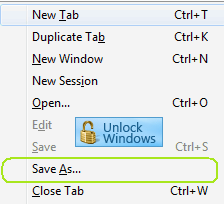
In Save As dialog box, select Webpage Complete in the Save as type: drop down menu.
And then Click on OK.
7.Increase your cache to load Web Pages faster.
Temporary Internet files cache plays an important role in Browsing as some images will get cached on your computer and when the Web Page is revisited it will take less time to open.
Increase the size of cache as follows:
•Open Internet Options either from Start Search (in Vista or Seven) or via Tools > Internet Options in Internet Explorer.
•In IE 6: On General tab, click on Settings in Temporary Internet files section.
In IE 7 or later: Click on Settings in Browsing History section.
•In ‘Check for newer versions of stored pages:’ click the Automatically radio button.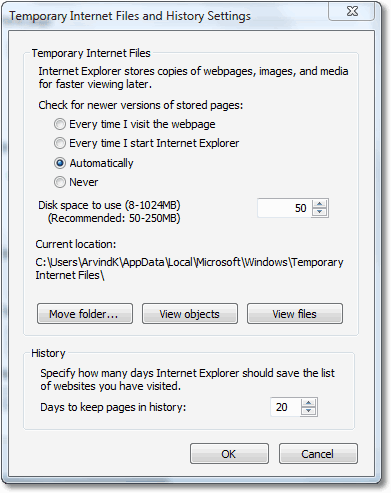
•In Disk Space to use set its value to 250 MB.
•Click on OK.
IE8 beats Chrome and Opera, Firefox stands second
The browser having the war can be separately downloaded from links given below as per your choice but facts says that IE8 resulted at top position in the Browser war.
Download IE8 for Windows XP: 32-bit 64-bit, Vista: 32-bit 64-bit, Server 2003: 32-bit 64-bit and Server 2008: 32-bit 64-bit.
Download Firefox 3.1 Beta 3 for: Windows Linux Mac OS X
Download Google Chrome's latest beta version.
Download Opera: 9.64 10.0 Build 1345 Alpha
Browser War resulted with IE8 as number Ist.
The following is a current list of the web browsers that were tested:
•Microsoft Internet Explorer v7
•Microsoft Internet Explorer v8 (RC1)
•Google Chrome v1.0.154
•Apple Safari v3
•Mozilla Firefox v3.07
•Opera 9.64
Once testing began, the product version was frozen in order to preserve the integrity of the test. This test relied upon Internet access for the reputation systems and access to live content. Generally, there is a configurable separation between software updates and database or signature updates – to draw analogies from the antivirus, IPS and general software practices.
To download the test result of browser war click here.
Source: Web Browser Security.
Internet Explorer 8 Released To Web (RTW) is ready to be grabbed.
Accelerators:Accelerators let you map directions, translate words, email your friends, and more in just a few mouse clicks.
In Private Browsing:Browse the web without saving your history with Internet Explorer 8's InPrivate Browsing. Now you can shop for that special gift with confidence knowing your family won't accidentally find out or use a shared computer without leaving a trace.
Web Slices:Keep up with changes to the sites you care about most. Add a Web Slice and you won't have to go back to the same website again and again for updates on news, stock quotes, online auctions, weather, or even sports scores.
Search Suggestions:Search smarter with detailed suggestions from your favorite search providers and browsing history. See visual previews and get suggested content topics while you type in the enhanced Instant Search Box.
Smart Screen Filter:New security features help to protect you against deceptive and malicious websites which can compromise your data, privacy and identity.
- More details on IE8's features can be viewed here.
- Learn more about Internet Explorer 8 with quick how-to videos.
- Click here to download the video describing IE8 performance over other browsers as IE8 is rated as fastest browser.

Choose your download from links below according your OS platform:
Windows XP | Windows XP x64 | Windows Vista | Windows Vista x64 | Windows Server 2003 | Windows Server 2003 x64 | Windows Server 2008 | Windows Server 2008 x64
Internet Explorer 8 RC 1 has now been released!
To see the Release Notes and IE8 Readiness Toolkit follow the link below.
Release Notes|IE8Readiness Toolkit
Notable Changes in IE8 Partner Build
If we go on tasting the web browsing via Microsoft Internet Explorer8 RC1 and so on with the coming final version we will see & feel different experience of web browsing as compared to that of with parallel ones available in market. Now let’s have a look on the changes made since Beta2 in RC1 of IE8 Partner Build:
Accessibility-ARIA: The camelCased syntax no longer exists for the ARIA(Accessibility Rich Internet Application) attributes as ARIA attribute names containing dashes, such as “aria-checked”, no longer have to be referenced by their camelCased equivalent (ariaChecked) in IE 7 mode and Quirks mode.
Ajax-XDR: XDR (Cross Domain Request) now checks Access-control-Allow-Origin header for specific URLs as well as wildcards.
Developer Tools: As in previous versions of IE like IE7 and IE8 Beta2 view source application in developer tool was only notepad and built-in viewer respectively. But now user is free to choose developer tool as per requirement via the Developer tool’s menu option. This provides more flexibility to the IE users.

• Syntactically valid filter declarations are applied in standards mode, even if unquoted Starting with IE8 Beta 1, the following filter declaration was not applied in standards mode:
filter: progid:DXImageTransform.Microsoft.Alpha(Opacity=80, FinishOpacity=70, Style=2);
Instead, IE8 standards mode required the following declaration:
-ms-filter: “progid:DXImageTransform.Microsoft.Alpha(Opacity=80, FinishOpacity=70, Style=2)”;
For web applications supporting both IE7 and earlier as well as IE8 standards mode, this meant maintaining both declarations and possible a third for other browsers in the case of opacity.
Starting with IE8 Partner Build, the first declaration above will be applied in standards mode if and only if its syntax is valid. If it is not e.g. the final parenthesis is missing then the declaration will not be applied and our CSS parser fails per the standard.
• CSS style sheet encoding detection complies with CSS 2.1 e.g. including @charset directive, charset attribute on link element etc.
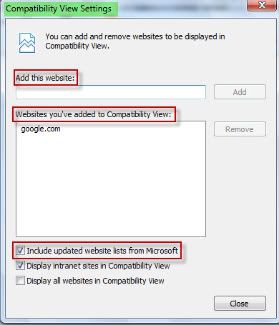
Compatibility View List: A new option for receiving updated lists of websites to be viewed under compatibility view is added under the compatibility view settings but still users can’t avail this facility update Until next release of IE.
 Filter Syntax Property: IE8 will accept the current filter syntax as well as the fully quoted syntax (“-ms” prefix) previously announced for IE8 in the Microsoft CSS Vendor Extension blog post.
Links Bar: Now users can customize the title widths of the items on Favorites bar and can place as many items as they want. Via this new option the size of Link bar items can be set to long(default), short(5 chars), or simply favicon.

InPrivate Blocking:
• InPrivate Blocking can be turned on or off via its button present on the status bar.
 • InPrivate Blocking can be turned on or off from Safety Menu’s entry or use keyboard shortcut Ctrl+Shift+B.
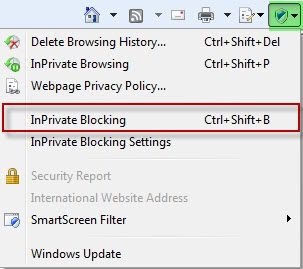 • It is now session-specific as will be off by default each time users launch IE.
• InPrivate Blocking can be turned on for all browsing sessions, not just InPrivate Browsing.
• InPrivate Blocking settings dialog UI is improved.
 • New feature first run dialog box.
InPrivate Subscriptions: InPrivate subscriptions have been removed.
InPrivate Browsing: While in InPrivate Browsing Add-ons will be disabled.
Smart Address Bar:
• Typed address count increased(up to 12 default, up to 25 in case History and Favorites are turned off).
• AutoComplete suggestions removed.
• By default Feeds are turned off. In order to turn it on check feeds from AutoComplete Settings dialog in ‘Tools->Internet Options->Content->AutoComplete Settings’.
IEAK8:
• Option “Add to the top of the list” is working now.
• Accelerators can be imported successfully.
• RIES Remove Branding feature has been cut.
Group Policy: To check the functionality now being supported and added open Local Group Policy by typing gpedit.msc in Run dialog box (or in start search bar in Vista). Navigate to ‘User Configuration-> Administrative Templates->Windows Components->Internet Explorer. Functionalities in Group Policy now supported are:
• Turn on Caret Browsing support.
• Turn off Cross Domain Request Object.
• Maximum number of connections per server (HTTP 1.0 and HTTP 1.1) changed from 2 to 128.
• Turn off Compatibility View button.
• Turn off the feeds list.

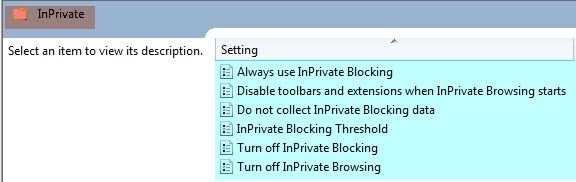
New Group policies added:
• Always use InPrivate Blocking.
• Do not collect InPrivate Blocking data.
• InPrivate Blocking Threshold.
• Disable toolbars and extensions when InPrivate Browsing starts.
• Disable InPrivate Blocking.
Known Issues:
Compatibility with Facebook:
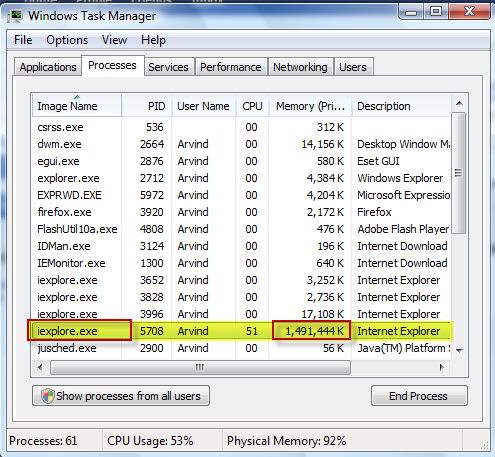
IE8 Partner build has known issue of the Facebook friends list program. The Browser hangs when user uses the “Add to list” box from the friends list. At this time there is no workaround. Here is a view of the issue when the browser hangs and it eats up all the memory of your system so as no other process have room to run smoothly.
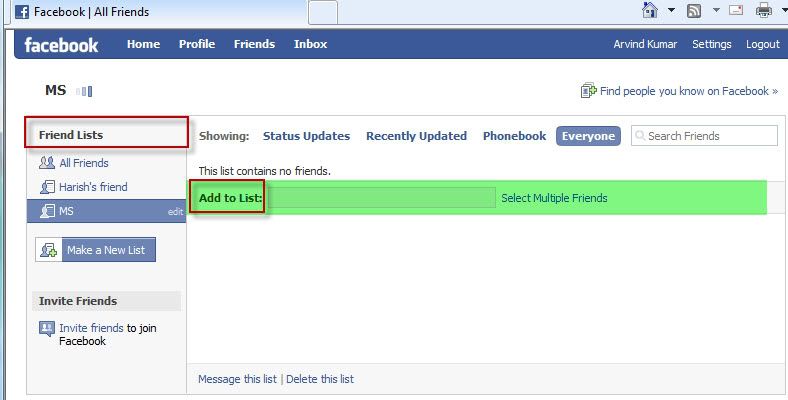
HTTP error which comes after using add to list box in friend list.

Memory eating up by single IE application running only facebook in it s one tab
New IE8 Build Available for Tech Beta Participants

Technet Subscriber can direclty download the IE 8 new build release via Microsoft connect and it seems that its RC is on its way to come in early 2009.
Buy Quick Heal at Cheap Price


Friends




Link to us

BlogAdda

About Me

- Arvind Kumar
- I'm Arvind Kumar from India, B.Tech, now working in a MNC. I love to use Microsoft Products and learn from that. Bill Gates is my ideal person.
