Apple iTunes ~ That's entertainment !!!
What is iTunes
iTunes a freeware for your Mac or PC which plays and organizes your digital music and video on your computer. All your media syncs with your iPod, iPhone, and Apple TV. And iTunes is like a store on your computer, iPod touch, iPhone, and Apple TV that has everything you need to be entertained. Anywhere. Anytime. Discover everything you need to know about iTunes. Have llok of A-Z features of iTunes.
iTunes ~ Your music collection. Your favorite movies and TV shows. Apps, games, podcasts, and more. iTunes is home to everything that entertains you.

- Entertainment never sleeps.
- Your entire digital music world. All in one Place.
- Just a click away from arena of Movies. rent or buy or watch them in minutes.
- Not far from you TV shows.
- Keep in touch with your favorite podcasts.
- App Store is always with you.
- Never ending lists of audiobooks waiting for you.
- The world's smartest download.
- Best Gift cards as iTunes.
 | Discover everything you need to know about iTunes. Have look of A-Z features of iTunes. iTunes 9.0.2 is available for Windows XP, Vista and Windows 7 too in both 32-bit and 64-bit. |
So what are you waiting for just tune into iTunes... Click here for downloading iTunes.

Got Invitation of New ORKUT! Now enjoying the new orkut !!!
After Google get inspired from the Facebook and Twitter features and popularity of Twitter they implemented the same to their Beta version of Orkut as New ORKUT BETA. The new versin is not open to all of its members but i got the invitation of that and using it. Now I'v five invitation which I can use to invite 5 more persons for testing the new version. Here is a snapshot of the new look and feel of new orkut:

With this new version of ORkut we'll find some new features as:
Fewer pages, faster browsing: We've concentrated orkut's principal actions onto your homepage, making it a one-stop-shop for nearly everything that you'd like to do. Now you can chat, watch videos, and browse and search within your full friends and communities lists without ever having to open a new page. See a photo, video, or status message in your activity stream that you'd like to comment on? Just start typing away. After all, fewer pages and a GWT interface mean less time waiting for things to load and more time doing what really matters– hanging out with your friends!
A clean, simple interface: We've reorganized the most important activites on orkut so that they are easy to find and even easier to use. Look out for larger pictures, easier to access notifications, targeted friend suggestions, and key updates closer to the top of your homepage. Now you can even use your friends' profile pages to keep up with their most recent activities and leave them scraps.
Greater personalization: Make your orkut profile and homepage truly your own by choosing the color that best fits your style. Have a personality that's too unique to be captured by words? We've also made it possible for you to customize your "about me" section, adding video, OpenSocial applications and much more to your array of options.
And much, much more: This is just a taste of all the new things you'll find on orkut. Learn more about all of the different features you'll find on the new interface by visiting this page on the orkut Help Center.
Just wait for this new sensation of ORKUT !!!
Courtesy: Orkut Blog
Yahoo Messenger 10, final version out: Installation & Download
Yahoo released Yahoo! Messenger 10 after its long life in Beta.This latest version (10.0.0.1102) incorporates many bug fixes, including some related to our new video call feature. We’ve also improved the overall stability of the product.
Much more interesting is that its is compatible with the new operating system i.e. Windows 7.
Improved features of it are:
Installation can be seen in quick snapshots as:
Step 1:
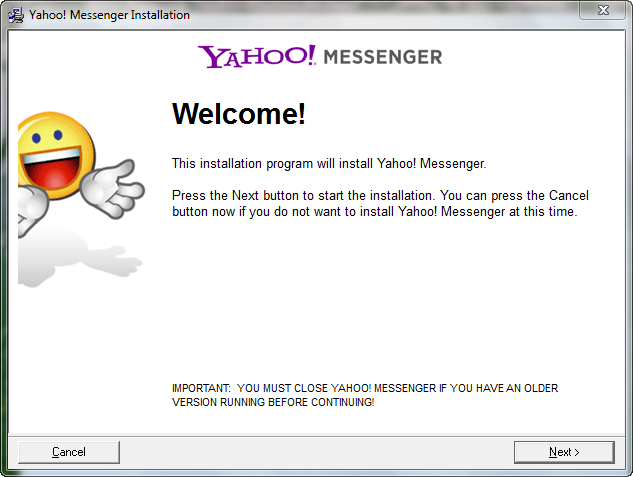
Step 2:
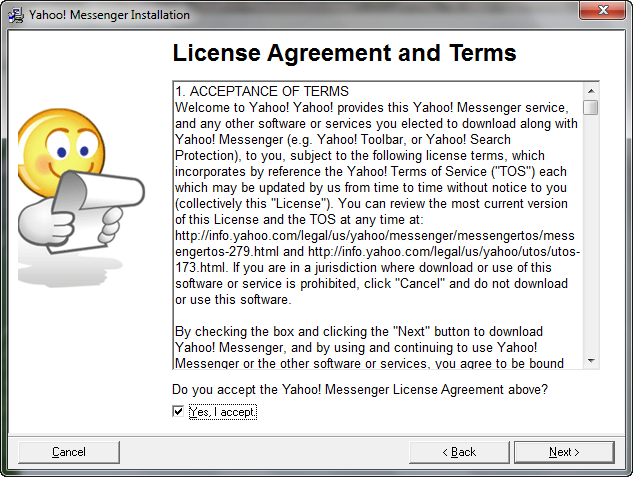
Step 3:
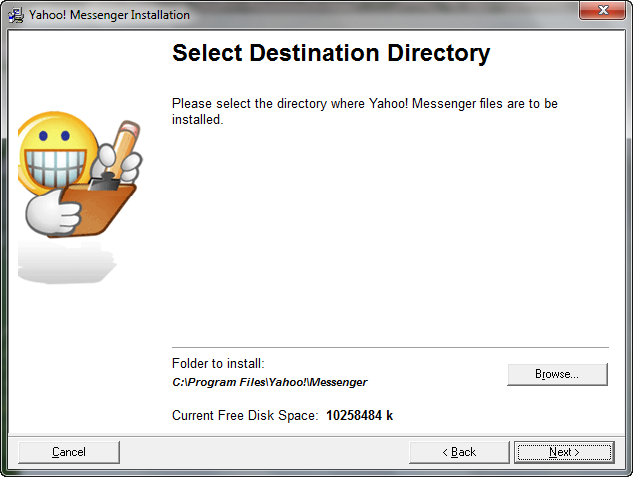
Step 4:

Step 5:

You can easily import contacts from your mail services listed in this version. Simply click on Start Adding Friends.
Step 6:
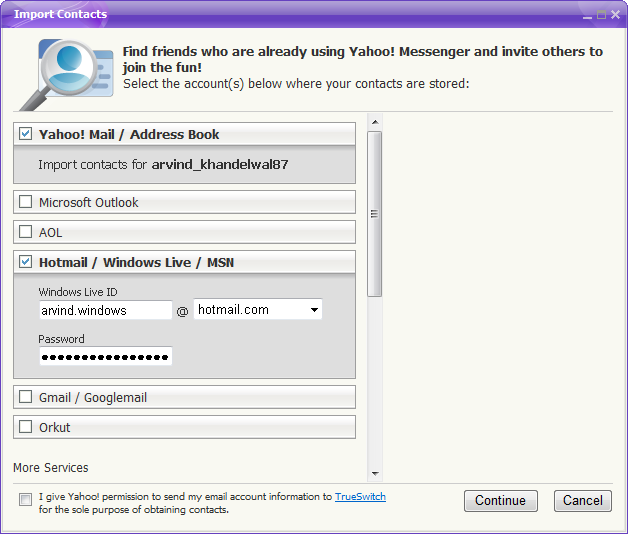
Just provide the Username and Password of your mail service and all of your contacts will get imported as per your requirement.
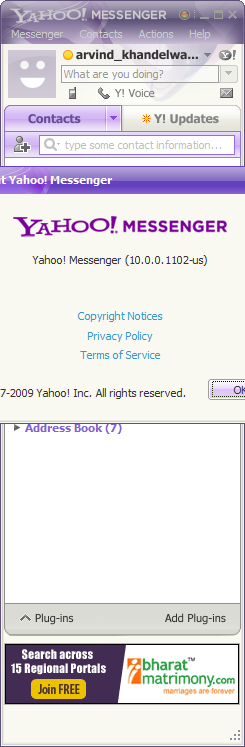
Aboout Page:
Watch the Video Demo.
Download Yahoo Messenger 10 ver. 10.0.0.1102.
For International Users, click here.
Much more interesting is that its is compatible with the new operating system i.e. Windows 7.
Improved features of it are:
- Instant message with one friend, or conference in a bunch
- All-new Insider with Yahoo! Mail, news, weather, search and more
- Easily find or invite friends from other services to come chat with you
- Send text messages (SMS) to friends' mobile phones for free
- Make free PC-to-PC calls and PC-to-phone calls for as low as 1¢ a minute (plus free voicemail!)
- Use the built-in media player to watch web videos and view photos with friends
- Show your style with emoticons, Avatars, audibles and IMVironments
Installation can be seen in quick snapshots as:
Step 1:
Step 2:
Step 3:
Step 4:
Step 5:
You can easily import contacts from your mail services listed in this version. Simply click on Start Adding Friends.
Step 6:
Just provide the Username and Password of your mail service and all of your contacts will get imported as per your requirement.
Aboout Page:
Watch the Video Demo.
Download Yahoo Messenger 10 ver. 10.0.0.1102.
For International Users, click here.
Enhance audio in Windows 7 to improve speaker configuration.
If you are facing a problem that your laptop's speaker (or individual one) is not giving upto the mark sound and you are expecting something hard then this will help you a lot.
In Windows 7 there is an option to Enhance the audio of your current speaker configuration which in turn improve your audio experience. Simply follow the steps given below:
Step 1:
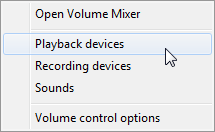
Right click on the volume icon in the System Tray and select Playback devices. Or navigate to Control Panel > Hardware and Sound > Sound.
Step 2:
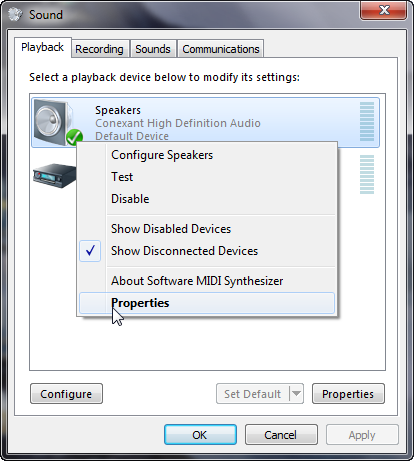
Now in the current tab i.e. Playback, right click on the Speakers and select Properties.
Step 3:
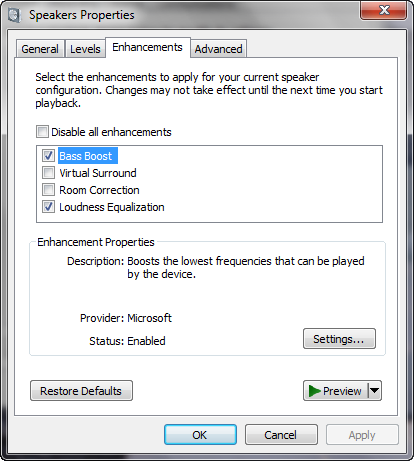
Navigate to Enhancements tab and uncheck Disable all enhancement if it is not checked.
Now Check the following options: Bass Boost | Loudness Equaization. and you can also check either Virual Surround or Room Correction, only one can be checked once. Now click on Apply and enjoy the enhanced sound coming right from your speakers. Happy Windows Computing !!!
In Windows 7 there is an option to Enhance the audio of your current speaker configuration which in turn improve your audio experience. Simply follow the steps given below:
Step 1:
Right click on the volume icon in the System Tray and select Playback devices. Or navigate to Control Panel > Hardware and Sound > Sound.
Step 2:
Now in the current tab i.e. Playback, right click on the Speakers and select Properties.
Step 3:
Navigate to Enhancements tab and uncheck Disable all enhancement if it is not checked.
Now Check the following options: Bass Boost | Loudness Equaization. and you can also check either Virual Surround or Room Correction, only one can be checked once. Now click on Apply and enjoy the enhanced sound coming right from your speakers. Happy Windows Computing !!!
Subscribe to:
Posts (Atom)
Buy Quick Heal at Cheap Price


Friends




Link to us

BlogAdda

About Me

- Arvind Kumar
- I'm Arvind Kumar from India, B.Tech, now working in a MNC. I love to use Microsoft Products and learn from that. Bill Gates is my ideal person.
