Notable Changes in IE8 Partner Build
If we go on tasting the web browsing via Microsoft Internet Explorer8 RC1 and so on with the coming final version we will see & feel different experience of web browsing as compared to that of with parallel ones available in market. Now let’s have a look on the changes made since Beta2 in RC1 of IE8 Partner Build:
Accessibility-ARIA: The camelCased syntax no longer exists for the ARIA(Accessibility Rich Internet Application) attributes as ARIA attribute names containing dashes, such as “aria-checked”, no longer have to be referenced by their camelCased equivalent (ariaChecked) in IE 7 mode and Quirks mode.
Ajax-XDR: XDR (Cross Domain Request) now checks Access-control-Allow-Origin header for specific URLs as well as wildcards.
Developer Tools: As in previous versions of IE like IE7 and IE8 Beta2 view source application in developer tool was only notepad and built-in viewer respectively. But now user is free to choose developer tool as per requirement via the Developer tool’s menu option. This provides more flexibility to the IE users.

• Syntactically valid filter declarations are applied in standards mode, even if unquoted Starting with IE8 Beta 1, the following filter declaration was not applied in standards mode:
filter: progid:DXImageTransform.Microsoft.Alpha(Opacity=80, FinishOpacity=70, Style=2);
Instead, IE8 standards mode required the following declaration:
-ms-filter: “progid:DXImageTransform.Microsoft.Alpha(Opacity=80, FinishOpacity=70, Style=2)”;
For web applications supporting both IE7 and earlier as well as IE8 standards mode, this meant maintaining both declarations and possible a third for other browsers in the case of opacity.
Starting with IE8 Partner Build, the first declaration above will be applied in standards mode if and only if its syntax is valid. If it is not e.g. the final parenthesis is missing then the declaration will not be applied and our CSS parser fails per the standard.
• CSS style sheet encoding detection complies with CSS 2.1 e.g. including @charset directive, charset attribute on link element etc.
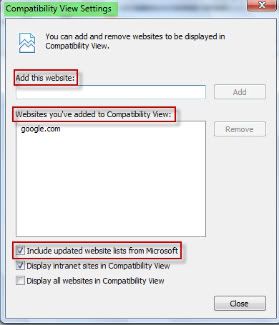
Compatibility View List: A new option for receiving updated lists of websites to be viewed under compatibility view is added under the compatibility view settings but still users can’t avail this facility update Until next release of IE.
 Filter Syntax Property: IE8 will accept the current filter syntax as well as the fully quoted syntax (“-ms” prefix) previously announced for IE8 in the Microsoft CSS Vendor Extension blog post.
Links Bar: Now users can customize the title widths of the items on Favorites bar and can place as many items as they want. Via this new option the size of Link bar items can be set to long(default), short(5 chars), or simply favicon.

InPrivate Blocking:
• InPrivate Blocking can be turned on or off via its button present on the status bar.
 • InPrivate Blocking can be turned on or off from Safety Menu’s entry or use keyboard shortcut Ctrl+Shift+B.
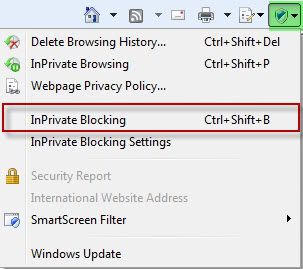 • It is now session-specific as will be off by default each time users launch IE.
• InPrivate Blocking can be turned on for all browsing sessions, not just InPrivate Browsing.
• InPrivate Blocking settings dialog UI is improved.
 • New feature first run dialog box.
InPrivate Subscriptions: InPrivate subscriptions have been removed.
InPrivate Browsing: While in InPrivate Browsing Add-ons will be disabled.
Smart Address Bar:
• Typed address count increased(up to 12 default, up to 25 in case History and Favorites are turned off).
• AutoComplete suggestions removed.
• By default Feeds are turned off. In order to turn it on check feeds from AutoComplete Settings dialog in ‘Tools->Internet Options->Content->AutoComplete Settings’.
IEAK8:
• Option “Add to the top of the list” is working now.
• Accelerators can be imported successfully.
• RIES Remove Branding feature has been cut.
Group Policy: To check the functionality now being supported and added open Local Group Policy by typing gpedit.msc in Run dialog box (or in start search bar in Vista). Navigate to ‘User Configuration-> Administrative Templates->Windows Components->Internet Explorer. Functionalities in Group Policy now supported are:
• Turn on Caret Browsing support.
• Turn off Cross Domain Request Object.
• Maximum number of connections per server (HTTP 1.0 and HTTP 1.1) changed from 2 to 128.
• Turn off Compatibility View button.
• Turn off the feeds list.

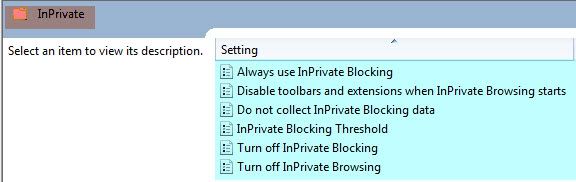
New Group policies added:
• Always use InPrivate Blocking.
• Do not collect InPrivate Blocking data.
• InPrivate Blocking Threshold.
• Disable toolbars and extensions when InPrivate Browsing starts.
• Disable InPrivate Blocking.
Known Issues:
Compatibility with Facebook:
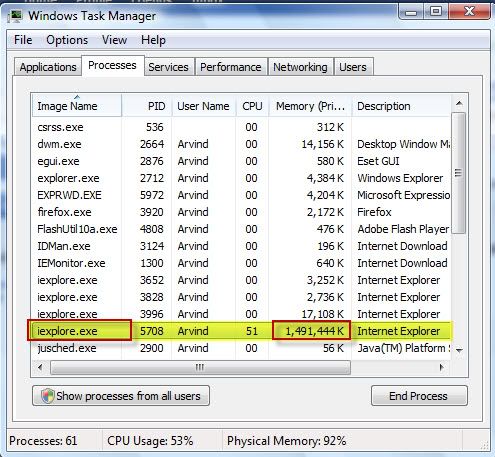
IE8 Partner build has known issue of the Facebook friends list program. The Browser hangs when user uses the “Add to list” box from the friends list. At this time there is no workaround. Here is a view of the issue when the browser hangs and it eats up all the memory of your system so as no other process have room to run smoothly.
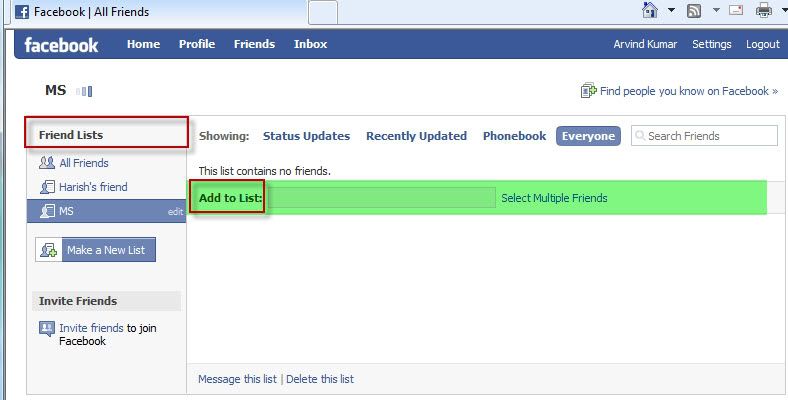
HTTP error which comes after using add to list box in friend list.

Memory eating up by single IE application running only facebook in it s one tab

Password Checker ~ Utility to check the strengths of the passwords
Everybody want to be safe, be secure and the way to remain safe and secure is
to use safe, secure and strong password so as to keep attackers away from safe
locations. But the question is how to create a stron password and then how do
one know that the passwords created by an user is safe or not or whether it is a
strong one or not. So don't worry Microsoft have its solution. The Redmond giant
provides a Password Checker Utility to check the strengths of the passwords.
Solution for creating strong password. Click here.
Solution for getting your passwords strength:
U can easily check strengths of your passwords. Example of Best password from my
view is like "ILuvMyQu@dC()re" it is easy to remember as "ILuvMyQuadCore"
different way. The password checker rates the passwords as Weak, Medium, Strong
and Best.
Password Checker
Windows 7 Beta available for download as early as Jan 5, 2009
The development of Windows 7 is going on and the Beta is at its final stage. Still the delivery deadline date is not confirmed but it is officially confirmed that downloads will be offered via the January 2009 Quarterly Update Kit through the Microsoft Action Pack Subscription (MAPS) from 5th of January.
Participants of the MSDN Developer Conferences will be receiving the DVDs of Windows 7 Beta 1 as early as January 13, 2009. Also the January 2009 kit will contain it along with Microsoft Virtual PC 2007, Windows Small Business Server 2008 Standard Edition, Windows Essential Business Server 2008 Standard Edition, Microsoft Hyper-V Server 2008, Microsoft System Center Data Protection Manager 2007 SP1, and Microsoft System Center Essentials 2007 SP1. The Beta participation program's invitation for testers is started by the Redmond giant for Windows 7 and Windows 7 Server (Windows Server 2008 R2).
WLM 9.0 Beta Refresh down on live
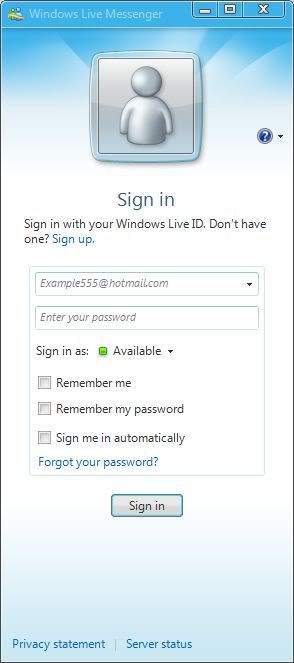
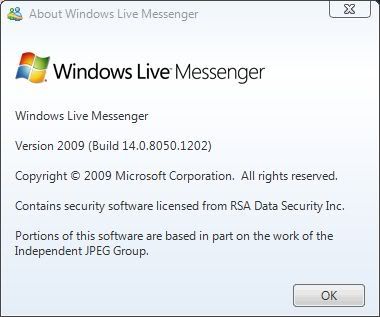
Click here to download the WLM 9.0 Beta Refresh.
Buy Quick Heal at Cheap Price


Friends


Link to us

BlogAdda

About Me

- Arvind Kumar
- I'm Arvind Kumar from India, B.Tech, now working in a MNC. I love to use Microsoft Products and learn from that. Bill Gates is my ideal person.

