Showing posts with label Security. Show all posts
Showing posts with label Security. Show all posts
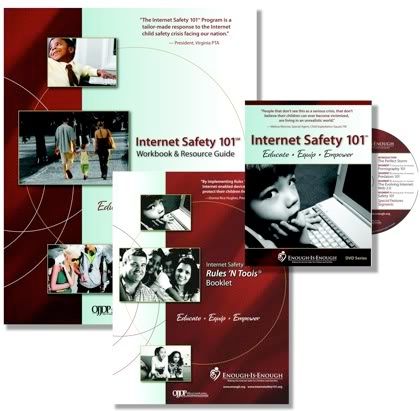
Keep yourself with Internet Safety 101 DVD.
Internet Safety 101 is a DVD helping parents, educators, and other caregivers so as to to help protect kids online. This DVD contains so many helpful tips with help of images and videos so that you can keep yourself from the dark side of the Internet.
Microsoft too is in the race of keeping us safe from the worst of Internet and so it recently joined forces with the organization Enough is Enough to publicize a new safety education program, Internet Safety 101.
As per Enough is Enough about page says:
"Enough Is Enough (EIE), a non-partisan, 501(c)(3) non-profit organization, emerged in 1994 as the national leader on the front lines to make the Internet safer for children and families. Since then, EIE has pioneered and led the effort to confront online pornography, child pornography, child stalking and sexual predation with innovative initiatives and effective communications."
For a brief knowledge about hte Internet Safety 101 DVD Series click here.

Password privacy: How it is done.
We already had a blog post on How to Create Strong Paswords. Password is something which is used to keep things secured, safe and away from threats so as to keep information protected. But as much as our information is imnportant and neccessary to be protected, in the same way password is also to be kept secret.
It is recommended to use strong passwords while accessing social networking websites, computer system etc where we keep our personal or financial information.
There are some key points to remember and follow as:
1. Never reply to an e-mail request asking for your password. There may be some Internet "phishing" scams using fraudulent e-mail messages requetin your e-mail's username and password.
2. Never provide your password over e-mail.
3. Never access your account from other system that you do not control as like in INternet cafes, in any conferences, computer labs, kiosk systems, and airport lounges. Such places are unsafe for account accessing activities.
It may be possible that Cyber criminals can use keystroke logging devices which gather whatever is typed on a computer, including passwords.
4. Never trust anyone so don't reveal your passwords to someone.
Its a good habbit to keep your passwords hidden from friends or family members (especially children) who could pass them on to other, less trustworthy individuals.
5. Keep your recorded passwords protected.
Never try to store passwords on a file in your computer, as these places are easy to be hacked. So always keep your record of the passwords in a safe, secure place.
6. Have more than one password.
Always try to keep different passwords for different Web sites and services.
Encrypt docs in Office 2010 using Password protect
We can protect our Word, Excel, PowerPoint docs in Office 2010 using the password encryption so that from next time whenever we try to open that document will prompt us for the password to open the file. In case we know the exact and valid password then only we are able to access the file else not.
The password encryption can be set to the doocument using the Offfice Backstage view. Steps to follow for the one are:
Step 1:

After clicking on the Office button above view comes in front of us.
Step 2:

Click on the Protect Document/Workbook/Presentation option and then select "Encrypt with Password".
Step 3:

Now set the Password to Encrypt the document. Remember the one you set here.
Step 4:

Reenter the password to confirm it.
Step 5:

Encryption completed and now when we try to open the document which you have encrypted will prompt us for the passsword in order to open the document.
Thats all !!! Happy Windows Computing.
Register for Microsoft's TechNet Weekly Webcast for IT Pros.


| Date | Time | Topic | Speaker | ||
| 07-Oct | 04:00 pm- 05:30 pm | Information Leakage Protection | Amol R Bhandarkar | Register | |
| 14-Oct | 04:00 pm- 05:30 pm | Planning an enterprise wide deployment of Bitlocker | Ranjana Jain | Register | |
| 28-Oct | 04:00 pm- 05:30 pm | SQL Server Security Part 1 | Vinod Kumar | Register | |
| 04-Nov | 04:00 pm- 05:30 pm | SQL Server Security Part 2 - Best Practices and Deployment | Ravi Sankar | Register | |
| 18-Nov | 04:00 pm- 05:30 pm | Security Compliance management of an IT environment running Microsoft Windows and Office Applications | Ranjana Jain | Register | |
| 25-Nov | 04:00 pm- 05:30 pm | Assess and implement security for your Windows Web servers | Ranjana Jain | Register | |
| 02-Dec | 04:00 pm- 05:30 pm | Understanding potential threats and implementing a safe internet browsing environment for your network | Ranjana Jain | Register | |
| 09-Dec | 04:00 pm- 05:30 pm | Malware removal made easy-tools and resources Speaker | Ravi Sankar | Register | |
| 16-Dec | 04:00 pm- 05:30 pm | Securing your messaging and collaboration infrastructure | Ravi Sankar | Register | |
| 23-Dec | 04:00 pm- 05:30 pm | Perimeter security; unified threat management using Microsoft Threat Management Gateway (TMG) | Ranjana Jain | Register | |
| 30-Dec | 04:00 pm- 05:30 pm | Next generation secure remote access with Direct Access & Forefront Unified Access Gateway | Ranjana Jain | Register |

[Download] Microsoft Releases Security Updates for Vista n XP SP3
As part of Microsoft's routine, monthly security update cycle, we released 1 new security update on January 13, 2009. Microsoft released this security release in form of DVD ISO image patched for its Client and Server Operating System. The DVD ISO image is available for Windows 2000, Windows Server 2003,Windows XP (including SP3), Windows Vista RTM/SP1, and Windows Server 2008.
The new security update is MS09-001 which addresses a vulnerability in Microsoft Windows (KB 958687). The DVD ISO image can be downloaded direclty from Microsoft links.
For downloading the updates for your home computer or laptop simply visit the Microsoft Update Web site.
Click here to download the DVD ISO image.
The new security update is MS09-001 which addresses a vulnerability in Microsoft Windows (KB 958687). The DVD ISO image can be downloaded direclty from Microsoft links.
For downloading the updates for your home computer or laptop simply visit the Microsoft Update Web site.
Click here to download the DVD ISO image.
Subscribe to:
Posts (Atom)
Buy Quick Heal at Cheap Price


Friends


Link to us

BlogAdda

About Me

- Arvind Kumar
- I'm Arvind Kumar from India, B.Tech, now working in a MNC. I love to use Microsoft Products and learn from that. Bill Gates is my ideal person.

