Showing posts with label Windows Live. Show all posts
Showing posts with label Windows Live. Show all posts
Microsoft came up with a solution for issue of Hotmail email access
In the end of last year Microsoft and its Live team faced a big issue of automatic vanishing of emails from several users Hotmail accounts (more than about 17K users.) And there was posting about such issues over and over last week on Windows Live Solution center but now they came up with solution. Hotmail team found the cause of the issue which led to the temporary lost of the mail box of the Hotmail account users. As per Windows Live they restored the account of impacted users of that concerned issue on Jan 2nd evening.
Still the Windows Live Team is investigating the issue, its root cause and making it sure that such kind of inconvenience not to happen again. It was to much embarrassing and shocking for the users but now all is well and team is recovering everything which was lost.
Source: Inside Windows Live

Chance to get your cloud photo featured on BIng's Homepage
Windows Live Essential 2011 is already on the floor consisting of so many products as a package with it. There is a contest is going on from Bing and Windows Live in order to highlight Windows Live Photo Gallery using which we can easily connect share, edit or organize the Photos of our choice.

Participants of the contest have to follow some rules and send some creative photos related to cloud and the lucky winner's photo will be featured on Bing Homepage on November 8th, 2010 and also opportunity for 10 winners selected in the Windows 7 theme pack. Just mail by Friday October 22nd, 2010 to WLcontest@hotmail.com. You can read the complete guidelines and contest rules here before going to submit the photos.
Now chat with Facebook friends via Windows Live Messenger 2011
We all are geeks but still we are part of various social networks and used to chat with all. Its a great news for all Windows Live Users that the Windows Live Essential 2011 is already out from the beta phase and now we can easily chat with our Facebook friends via Windows Live Messenger easily as in an integrated service to chat with them is made available in this new edition. This excitingly new and awesome feature is made available in several countries like Canada, Australia, Netherlands, Italy, Spain, Turkey, United States, United Kingdom, France, Brazil, Germany, and Russia including India and the list will get updated soon. There are more than 300 million customers of Windows Live Essential worldwide and the counter goes on.

Allow the chat option to be integrated in Windows Live Messenger so that you can chat with your Facebook friends via Windows Live.

Finally you are connected to Facebook and now you can even opt to add yourself to other services too.

Have a look of this amazing feature where you can easily chat with your Windows Live friends and even the Facebook friends. Just see the screenshot give below.

So isn't it simple and great. That's the Windows Computing.
In order to use this integrated chat feature simply login to Windows Live using your Windows Live ID and then wither visit to Windows Live Services or you'll be directly prompted for that when you'll sign in first time to Windows Live Essential 2011.
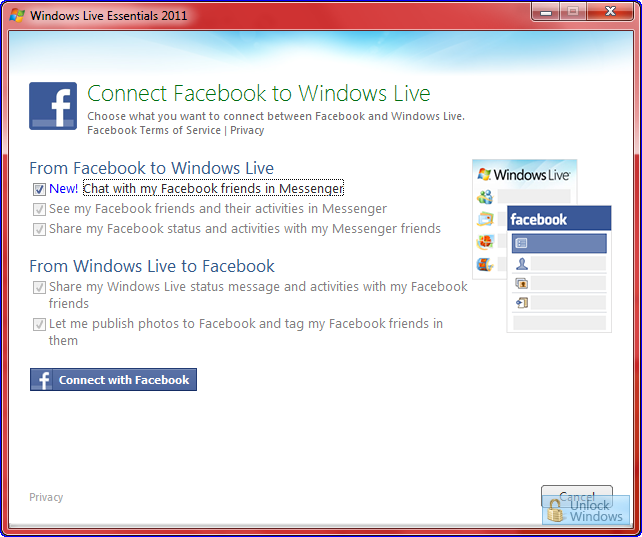
Allow the chat option to be integrated in Windows Live Messenger so that you can chat with your Facebook friends via Windows Live.
Finally you are connected to Facebook and now you can even opt to add yourself to other services too.
Have a look of this amazing feature where you can easily chat with your Windows Live friends and even the Facebook friends. Just see the screenshot give below.
So isn't it simple and great. That's the Windows Computing.
Windows Live Essentials 2011 is on floor to download.
Windows Live Essential 2011 ( The wave 4 version ) is released now and is readily available for download as Offline installer and Web installer. Gradually releases of beta of the product finally led to this final build as 15.4.3502.0922 build number. It is fully compatible to Windows 7 and support all it s features as like of Jump lists and is fully loaded with several products with Ribbon UI.

The beta build of it was used by millions of peoples worldwide and now with feedback from all those this final version is released and also Dell will ship PCs with Windows Live Essential 2011 and Windows 7 pre-installed. This build includes Windows Live Messenger, Photo Gallery, Mail, Movie Maker, Writer, Mesh, Family Safety, and Sync, in addition to Bing Bar and Messenger Companion.
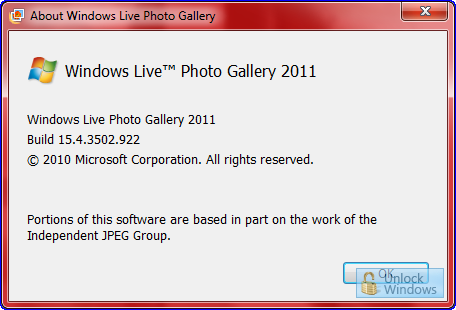
Download the Windows Live Essentials:
Twitter feed no longer imported to Hotmail now onwards

Yesterday I got mail from Windows Live stating that Twitter service will no longer will be available via Windows Live and now onwards our tweets will not be automatically imported and shared out to Windows Live Messenger friends as per some changes in the Twitter policy. Windows Live other connecting services like Facebook, MySpace, Flickr and many more will be still as it is and will have no impact over them due to Twitter policy change and Live Team is contacting Twitter and will soo sort out the things till then Twitter is out from Windows Live Contacting Services list.
Connect Hotmail to your Mobile and chance to Win HTC HD2
Yes you heard it right!

Simply use SMS alerts on your phone straight away from your Hotmail inbox by activating the service and stand a chance to win the brand new exciting featured HTC HD2 every week. For such an amazing offer follow 3 simple steps:

Simply use SMS alerts on your phone straight away from your Hotmail inbox by activating the service and stand a chance to win the brand new exciting featured HTC HD2 every week. For such an amazing offer follow 3 simple steps:
- Activate SMS alerts for Hotmail
- Tell us why 'Hotmail on SMS is hot!'
- Send us an email with your reply on WinHD2@hotmail.com
Windows Live Essentials Beta ( Wave 4 ) available for download.
I'm glad to say that Microsoft finally released the beta of Windows Live Essential Wave 4 for which all geeks like us and end users too were curious and were waiting eagerly. Now we can easily grab the beta of it and can taste it, simply follow the links given below but before that lets have a sneak preview of the same.
Installation starts here to enter into the World of Windows Live Essential Wave 4:

Choose the Programs as Custom installation is in progress:

Just simply Sign In to your Windows Live ID:

Home page of after Sign In and we can see updates of Hotmail, Facebook, Twitter, Flickr and lots more:

Windows Live Photo Gallery:

I think its quite enough and you cant wait more so here are the links:
Download | News
Windows Live Hotmail: Stay Connected by adding various Web Activities to your Live ID
Windows Live Hotmail provides an option to Add Services from various other Websites to be linked with the user's hotmail and provides updates about that sites on the home page of hotmail account of users. All the services so added in the list are categorized as likely to be easily understood. Near about every social network, community forum, several image service provider etc. Complete list can be seen easily from the home page of your hotmail .
Click on Add Web Activities on the Home Page of your Hotmail Account.

Now You can see the complete list of the Service Providers names alongwith category view also.
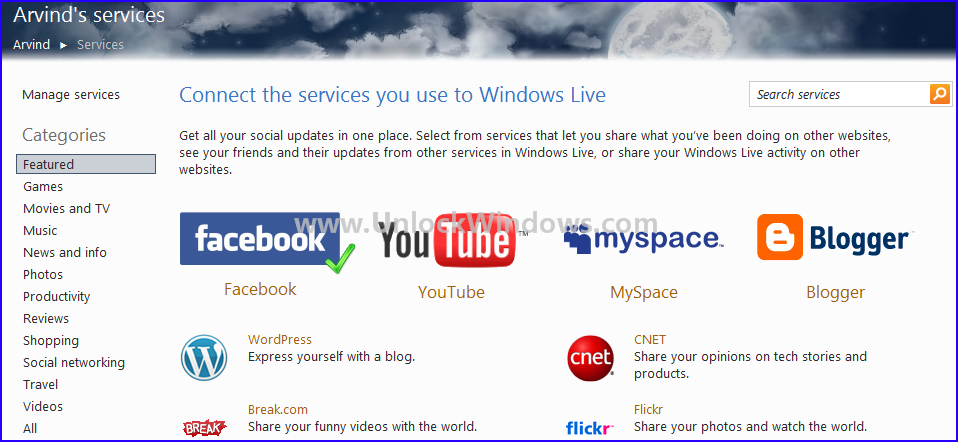
As I already added Facebook so it is marked with a Green Tick Mark.
Yoiu can choose anyone Service which you want to avail like here as Flickr:
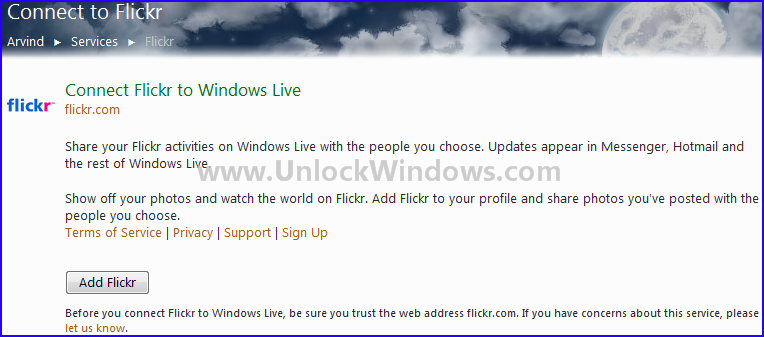
It is asking to Add Flickr service. Click on Add Flickr. After this it will ask for your Yahoo account detail to log you in to your Flickr account. After you suuccessful login, your update of Flickrs will be available in Hotmail Account from where you can share photos you uploaded with rest of world and updates comes ot Hotmail, Messenger and rest of Windows Live.
So this is how you can set your Web activities and add it to your Windows Live ID.
Simple and amazing Windows Computing!!!
How to setup parental controls in Windows Seven
Parental Controls can be used to manage how the children use the computer. Like we can set limits of using the computer, the types of game they can play, and type of program they can run. With the help of Parental Controls we can easily monitor the activity of our children.
Just follow the simple steps in turn to activate and use the Parental Controls:
1. Click on Start and then click on your account pic to opn the User Account.

2. Now click on Manage another account.

3. Create a new account and assign the type to it as whether an Administrator or Standard user.

4. Select the account for which you want to setup the Parental Control by clicking on Setup Parental Controls.

5. Choose On Radio Button from Paretal Controls section to enforce current settings.

6. Sign in to Windows Live Family Safety Filter for setting website's control over the aacount, as what they visit, what are they doing online etc.

7. Apply the settings and you are done.

Now you and your childre are safe with the help of Parental Controls and can easily monitor their activities over usage of computer, game playing , running of programs and also the world of Internet they are moving in. Happy Windows Computing..!!!
Just follow the simple steps in turn to activate and use the Parental Controls:
1. Click on Start and then click on your account pic to opn the User Account.
2. Now click on Manage another account.
3. Create a new account and assign the type to it as whether an Administrator or Standard user.
4. Select the account for which you want to setup the Parental Control by clicking on Setup Parental Controls.
5. Choose On Radio Button from Paretal Controls section to enforce current settings.
6. Sign in to Windows Live Family Safety Filter for setting website's control over the aacount, as what they visit, what are they doing online etc.
7. Apply the settings and you are done.
Now you and your childre are safe with the help of Parental Controls and can easily monitor their activities over usage of computer, game playing , running of programs and also the world of Internet they are moving in. Happy Windows Computing..!!!
Windows Live Messenger 4 Preview available via website.
Recenlty we were listening to the news of a new wave of Windows Live 4 and now Microsoft is working on it and we can have a preview of it from its preview website.
WindowsLivePreview is the one where we can see the features and news regarding the new wave of Windows Live. This website previews Windows Live Messenger Wave 4 having lots of improvements and new additions. This refreshing new Messenger seems much promising with new features making the messenger easier to stay in touch with the people from different social networks and share.
We can see a sneak previewof the Hotmail preview here:

Join i'm inititative from Microsoft to help social causes.
Microsoft® started a new initiative named as "i'm MAKING A DIFFERENCE" which helps social causes easily. As we all are part of Windows Live™ Messenger or Windows Live Hotmail® and we can help socail causes through these small things like e-mailing, IMing which we used to do everday. Simply Microsoft® will share a portion of their advertising revenue with the cause we choose from among their partner social cause organizations. This will make a big difference.

How to know which server you are on? Here is a way.
As we already know that Hotmail have millions of users from all over the world and the user accounts of these users are spread over numerous servers. If any body wants to know that which server is hosting their user account and here is way to do this. This will help at the time of maintenance which Hotmail does sometimes then they mention this thing at their blog with server name that some particular server is under maintenence or experiencing some problem and we can easily get to know whats exactly the problem in case we face some problems regarding hotmail services.
Simply hover you mouse over any of the links under Related places present at the bottom left hand corner and check out the status bar.
 Or see the address bar where you get a web address similar to given below:

Simply hover you mouse over any of the links under Related places present at the bottom left hand corner and check out the status bar.
 Or see the address bar where you get a web address similar to given below:
In this URL, address is somewhat like this as:
http://snt114w.snt114.mail.live.com/default.aspx?rru=inbox&wa=wsignin1.0
So here the server for this hotmail account is snt114.
SkyDrive Explorer -Powerful Extension for Windows Explorer: Download, Installation & Working
SkyDrive Explorer
Introduction: Hotmail users already used the SkyDrive and also found it very interesting but it is not possible to access the SkyDrive using your Windows Explorer. We have to visit to the SkyDrive Web Link in order to do so. But now we have solution to the problem. SkyDrive Explorer is a 3rd party tool of mere 1.23 MB which is avaiable for download as freeware. Its a powerful extension for Windows Explorer which makes our daily task with documents from Microsoft Live SkyDrive using Windows Explorer itself and it seems that as if they are on our computer.
No need to install or configure and to do complex programming rather simple installation of Skydrive Explorer which will organize the interaction with the online storage itself.
Features: SkyDrive Explorer is easy to use and is loaded with lots of features.
1. Multifunctional: SkyDrive Explorer with its Beta version 1.2 is providing following functions:
•Explore the structure and contents of folders in SkyDrive™;
•Viewing files information (type, size, creation date in GMT format);
•Create new root folders and subfolders;
•Copy files from/to the storage to/from computer;
•Delete files and folders;
•Copy folders and subfolders from the storage to the computer keeping their structure;
•Use Drag & Drop for files operations;
•Rename files and folders;
•Create links to SkyDrive™ folders on your computer;
•Copy URL of the selected object(s) to the Clipboard;
•Automatic check for the latest version;
•Bidirectional languages support.
2.Fast: Its fast as it will let us operate on group of objects which is not possible via web browsers.
Multi operations includes:
•Renaming objects;
•Deleting group of objects;
•Copying folders with subfolders and files from SkyDrive™.
3. Easy: With SkyDrive Explorer we work efficiently by using basic operations on files and folders in Windows Explorer.
4. Secure: SkyDrive Explorer make use of the standard Microsoft library for work with Windows Live Id services. Personal information is not passed to Skydrive engine and each bits passes through HTTPS and protects data from snoopers.
5. Cross-platform: It supports both 32-bit as well as 64-bit. SkyDrive Explorer requires minimum Windows Xp and also successfully compatible with Windows Vista, Windows server 2003 & 2008, and Windows 7 too.
Installation Snaps:
•Explore the structure and contents of folders in SkyDrive™;
•Viewing files information (type, size, creation date in GMT format);
•Create new root folders and subfolders;
•Copy files from/to the storage to/from computer;
•Delete files and folders;
•Copy folders and subfolders from the storage to the computer keeping their structure;
•Use Drag & Drop for files operations;
•Rename files and folders;
•Create links to SkyDrive™ folders on your computer;
•Copy URL of the selected object(s) to the Clipboard;
•Automatic check for the latest version;
•Bidirectional languages support.
2.Fast: Its fast as it will let us operate on group of objects which is not possible via web browsers.
Multi operations includes:
•Renaming objects;
•Deleting group of objects;
•Copying folders with subfolders and files from SkyDrive™.
3. Easy: With SkyDrive Explorer we work efficiently by using basic operations on files and folders in Windows Explorer.
4. Secure: SkyDrive Explorer make use of the standard Microsoft library for work with Windows Live Id services. Personal information is not passed to Skydrive engine and each bits passes through HTTPS and protects data from snoopers.
5. Cross-platform: It supports both 32-bit as well as 64-bit. SkyDrive Explorer requires minimum Windows Xp and also successfully compatible with Windows Vista, Windows server 2003 & 2008, and Windows 7 too.
Installation Snaps:

Step 1: Start the installation by double clicking on the executable file.

Step 2: Choose the destination folder where SkyDrive Explorer should be installed.

Step 3: After clicking on Install button, the installation process progresses and copies respective files.

Step 4: Click on Finish and it will create a new Icon in Windows Explorer of SkyDrive Explorer from where it can be launched.
Starting SkyDrive Explorer:
Simply open the Windows Explorer and look for the Icon of Skydrive Explorer as shown in below's snapshot.

Double Click on the Icon of SkyDrive Explorer and watch it out.

When we double click the icon of SkyDrive Explorer, a dialog box comes in front of you and it will ask for login information of your Windows Live ID. Simply provide the Windows Live ID and its password or click on Sign up for a Windows Live ID.

Now as we can see here that our Windows Live SkyDrive is visible directly via Windows Explorer and easy to navigate as we used to do in our simple files and folders. All tasks which we perform ususally in Windows files and folders are all applicable to this SkyDrive Explorer.
Note: SkyDrive Explorer is an 3rd party application and is not a Microsoft developed application.
Download:
SkyDrive Explorer is in its Beta phase and can be downloaded for free. Its version 1.2.0.36 is out for Microsoft Windows and is compatible to run on Windows XP, Windows Vista. Windows Server 2003, Windows Server 2008, and Windows 7.
To download the latest Beta build click here.
How to Create an Event in Windows Live Calendar.
As Windows Live Events is going to be retire, we can create Events in Windows Live Calendar with simple step by step instructions as given:
1. Go to Windows Live Calendar

Click on New. From the pull-down menu so came select Event.

2. Now click on Add more details. Here type the details of events like What, Where, Time of event.

3. Click on Invite People and select your friends. Simply add emails of friends from the contacts list.

4. Click Send invitation. All the details of your get-together wil be sent to the invited people.

1. Go to Windows Live Calendar
Click on New. From the pull-down menu so came select Event.
2. Now click on Add more details. Here type the details of events like What, Where, Time of event.
3. Click on Invite People and select your friends. Simply add emails of friends from the contacts list.
4. Click Send invitation. All the details of your get-together wil be sent to the invited people.
Windows Live Events service ending in 2010.
Windows Live Events Service from Windows Live team is going to be retired in 2010 and starting from today onwards no new events can be created. Only accessing and editing of existing events can be done. If any one having events created on todays date then they will be available till April 2010 and in case you want to save your photos, videos then have to be done before April 2010.

Saving photos
Saving photos
- Go to http://events.live.com/ and sign in with your Windows Live ID.
- Click View your events at the top of the page.
- Click the event you want to save photos from. and then click the Photos link on the left side of the event page.
- Select the photo album that you want to save, and then click More at the top of the page. In the More dropdown menu, click Download, and then click Download with Photo Gallery.
- Select the photos that you want to save, and then click Download.
Saving files - Click the SkyDrive link on the left side of each event page.
- Select the Documents folder.
- Click the specific file that you want to download.
- Click Download, and then open the file or save it to your computer.
After April 2010 Windows Live Events will end entirely and no access to old events or to photos, videos will be avaialble. Microsoft is not planning to start a new service for events separately, but an easier way to manage and share your appointments, events, to-do lists and reminders all from one place: Windows Live Calendar. Simply click here to know How to create events in Windows Live Calendar
New Windows Live Movie Maker available for download.
Microsoft released new version of Windows Live Movie Maker capable of running on Windows 7 and on Windows Vista but not on Windows XP or earlier version. It is available for download on Live site in 18 languages including Hindi and Gujarati. The version update is 14.0.8089.726. New File Formats are supported as Windows 7 also included some noe File Formats like *.mov, *.qt, MPEG-4. New sharing features added as if wanan share movies on some video sharing site like YouTube, Facebook.

For some new features and have its preview visit MovieMakerPreview site.

Download the New Movie Maker.
Download Sample Content Packages: “A Year In The Life” and “New Baby”
For some new features and have its preview visit MovieMakerPreview site.
Download the New Movie Maker.
Download Sample Content Packages: “A Year In The Life” and “New Baby”
Windows Live Planet ~ Another Network from Microsoft.
Here guys and pals have an amazing news regarding another social network from Software Giant "Microsoft" presented in entirely different manner with lots of fun, offers, opportunities etc.
"Windows Live Planet", yeah this is the gate of the network which will lead to you date with teen diva's, which will lead you to live the life of a supermodel, which will lead you to meet the one of the top designer, which will lead to you the life of bolly beauties, which will lead you to and the list never ends. So why to wait simply Join WindowsLivePlanet.com, match n make friends, chat with them with Live messenger present in it which will let you sign in automatically as you switch to WLP.

Just go to Windows Live Planet and see the magic, feel the magic and take the awesome experience which you never felt while being on any other social network. So now the time for being on India's Best Planet i.s Windows Live Planet.
"Windows Live Planet", yeah this is the gate of the network which will lead to you date with teen diva's, which will lead you to live the life of a supermodel, which will lead you to meet the one of the top designer, which will lead to you the life of bolly beauties, which will lead you to and the list never ends. So why to wait simply Join WindowsLivePlanet.com, match n make friends, chat with them with Live messenger present in it which will let you sign in automatically as you switch to WLP.
Just go to Windows Live Planet and see the magic, feel the magic and take the awesome experience which you never felt while being on any other social network. So now the time for being on India's Best Planet i.s Windows Live Planet.
An Overview of Recent Updates to Windows Live
Over the past few weeks, we’ve introduced quite a few improvements to Windows Live. I thought it would be nice to list all those improvements in a single blog post for everyone to read.

New web activities
Add new contacts to Windows Live
Messenger has come to Hotmail
Arrange your Photos in Windows Live SkyDrive
Photos of you
SkyDrive takes your Favorites
Windows Experience Blog

New web activities
Add new contacts to Windows Live
Messenger has come to Hotmail
Arrange your Photos in Windows Live SkyDrive
Photos of you
SkyDrive takes your Favorites
Windows Experience Blog
Windows Live Essential RTW on the floor. Grab it.
Finally the wait is over and Microsoft lastly made Windows Live Essential RTW avilable for download in the CES held at Las Vegas. And most important thing regarding this release to web build is that is free and works fine on Windows 7 beta too with Windows Vista and Windows XP operating system.
Also Dell and Facebook are signed as key partner with Microsoft's Live Essential. Soon Facebook users will share activities and updates via it and Dell will made avialable preinstalled PCs.


Also Dell and Facebook are signed as key partner with Microsoft's Live Essential. Soon Facebook users will share activities and updates via it and Dell will made avialable preinstalled PCs.
WLM 9.0 Beta Refresh down on live
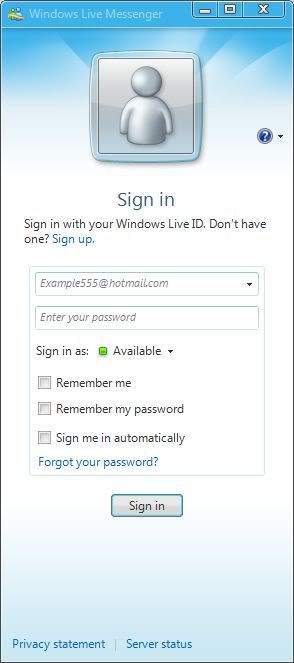
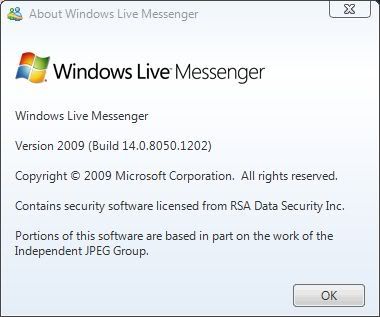
Windows Live Messenger is moving step by step towards RTW(Release To Web) with its new Beta Refresh avialable for download at Live. THis version (9.0) Beta Refresh is having a redesigned sign-in screen making it different from the existing beta packaged under the Windows Live Essentials avialable on web. Also its style and GUI is also enhanced which are only cosmetic modification. But still there are no indication by Redmond giant regarding release date of the next iteration of it. The version available is up to Build 14.0.8050.1202 and this Beta shows the sign of RTW arrival soon. The new sign-in screen can be seen below.


Click here to download the WLM 9.0 Beta Refresh.
Click here to download the WLM 9.0 Beta Refresh.
Subscribe to:
Posts (Atom)
Buy Quick Heal at Cheap Price


Friends


Link to us

BlogAdda

About Me

- Arvind Kumar
- I'm Arvind Kumar from India, B.Tech, now working in a MNC. I love to use Microsoft Products and learn from that. Bill Gates is my ideal person.

