Showing posts with label Beta Products. Show all posts
Showing posts with label Beta Products. Show all posts
[Beta Offer] Signup for "Age of Empires online" beta.
After so many successful gaming versions of Age of Empires, this time gaming has changed the way of presenting. Age of Empires is online and its beta signup is going on. So be the first to participate in the beta and play the most exciting mission game online with your friends. You can have a look over its official trailer:
As the game is online it offers so many features, as per www.ageofempiresonline.com game play features include:
- Familiar Age of Empires gameplay
- Download and play from almost anywhere
- Game continues to evolve over time
- Cooperative multiplayer quests and trading
- Empire creation and resource management
- Historical setting, easy-to-use RTS controls
In order to have a feel of the game you need to signup for the beta | Signup link for Beta registration of Age of Empires online.

[Download] Yahoo messensger 11.0 Beta
Yahoo messenger 11 Beta is available to test all over the world and it is now loaded with much more entertainment, customization and great improvements. Its easy to install:

Best features includes:
- You can easily chat with your friends which are on other services like Facebook.
- Video chat made easy with full screen high quality video.
- Send SMS to your friends free of charge.
- Conferencing is integrated in this build.
- More emoticons, Avatars, audibles and IMvironments to express your feelings.
- Integrated media player for watching web videos and for viewing photos with friends.
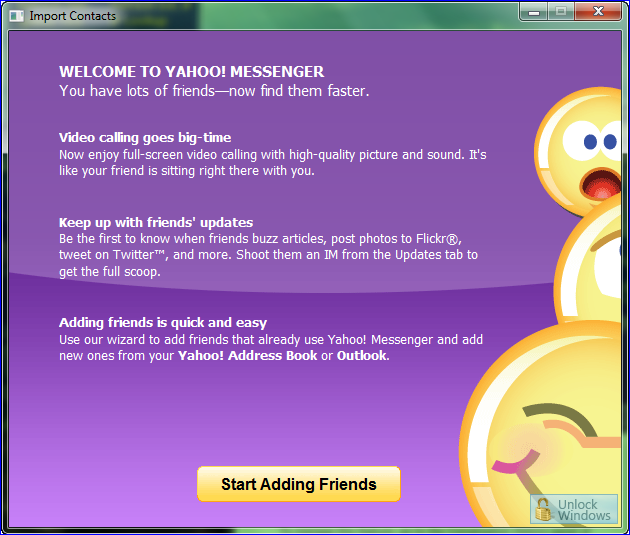
Add friends with a click:
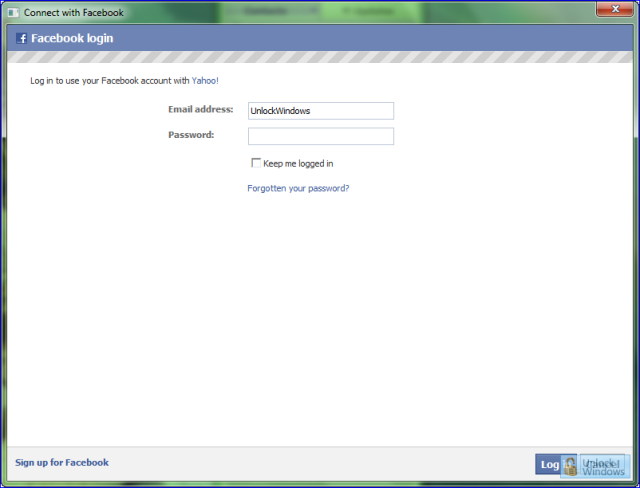
Easy to connect to your facebook friends and enjoy chat:
User Interface is made very elegant:

Yahoo messenger is also available for International users covering areas like Americas, Europe, Asia Pacific.
The beta version of this tool is freely available and we can use it, test its features and be connected with our friends all over the world in a new environment with lots of new features which are all free of cost. Any osrt of problem can be easily reported to Yahoo directly from your own Yahoo Messenger. Just navigate to Help menu and then click on Report a problem to Yahoo.
Download and other related links:
The beta version of this tool is freely available and we can use it, test its features and be connected with our friends all over the world in a new environment with lots of new features which are all free of cost. Any osrt of problem can be easily reported to Yahoo directly from your own Yahoo Messenger. Just navigate to Help menu and then click on Report a problem to Yahoo.
Download and other related links:
Internet Explorer 9 Platform Preview 7 released.
IE9 is going on in beta and its platform preview are releasing regularly with lots of improvements and enhancements. This time after platform preview 6 was released on 28th of last month, platform preview 7 is on the floor. It includes the real-world performance improvements across sites on the web. In each release there is improvements over JavaScript and with HTML5, chakra and Microsoft's JavaScript engine, IE9 is now leading over all other browser in performance based on JavaScript as per Webkit SunSpider. All over the world Internet Explorer is users choice and being adopted by users rapidly. As per date IE9 beta had moreover 13 million downloads since launch.
Performance Gains in Platform Preview 7
WebKit SunSpider results can be seen here:

Improvement and performance gain of platform preview 7 is clear by seeing the video and the WebKit SunSpider results over JavaScript.
Important and related links for IE9 platform preview can be easily grabbed:
-> Download IE9 Beta
-> Test Drive IE9
-> For more details on the Twitter Live chat.
Try Style Jukebox (Beta) media player based on .NET technology.
Recently I came to know about Style Jukebox (Beta) at TheWindowsClub so I thought of installing the player so as to taste the work of developer, and i found it intereseting thats why here I am sharing my experiences of using it.
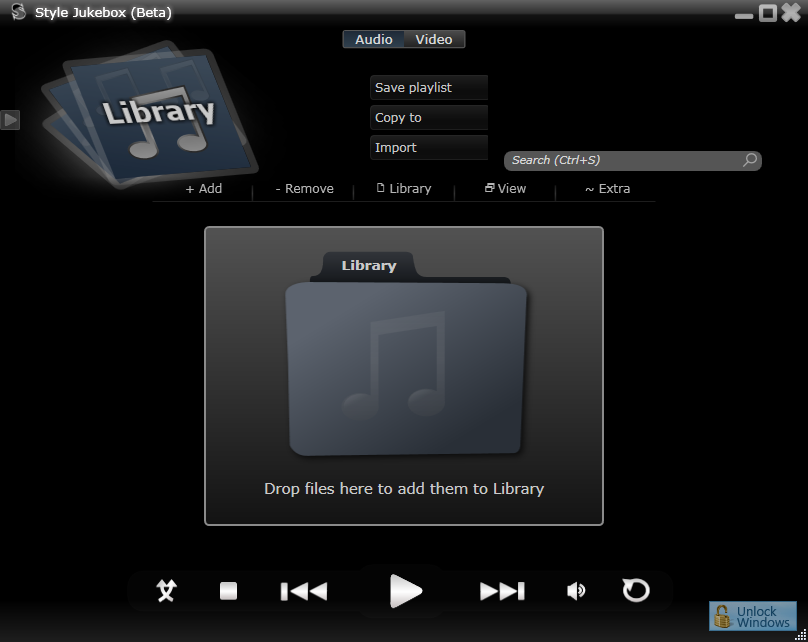
Style Jukebox is media player based on the .NET technology and it lets you play audio, video with features like: Folder Watch, Grid View, Codec manager, extrernal search, Video mini preview, iPod support etc.
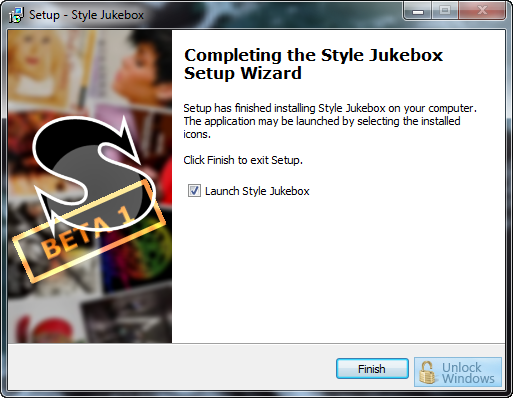
Its easy and sleek UI helps an end user in enjoying music and also its wasy to install:

Home Page of Style Jukebox Player:

Click for more details and download StyleJukebox
Bitdefender 2011 available for beta testing. Become Beta Tester for this campaign.
Bitdefender is now entering its new generation into Total Security 2011 and this time it will be an opportunity to become beta tester in this campaign of Bitdefender with a chance to win one Apple iPad and one Nintendo Wii and 100 Bitdefender licenses. Simply visit the Bitdefender beta webpage and follow the test guidelines posted there.

System Requirements for Bitdefender Total Securiy 2011:
Microsoft Windows XP SP3 (SP2 for x64), Vista (SP1), Microsoft Windows 7
Internet Explorer 6 (Internet Explorer 7 recommended)
RAM: 512MB (Windows XP), 1 GB(Windows Vista, Windows 7)
Processor: 800Mhz
So what are you waiting for, just visit Bitdefender 2011 Beta Campaign
Microsoft presents Spindex, your entire social world in one page.
Your entire social world is in one page now with Spindex, Tech preview from Microsoft's Fuse labs. Reecntly Microsoft Fuse lab launched Docs for Facebook and now this amazing Spindex which let you connect to Facebook, Twitter, Evernote, RSS, and Bing and many more adding soon.
You can access and interact wth your social networks, see realted informatino from Bing, see trends from friends and also Spindex finds useful articles and information based on your interest in your friend's messages and comments.

Docs.com, a new Facebook app from Microsoft via Fuse Labs
Up till now we were not able to create or share Office documents with our Facebook friends but now as we all know that Microsoft Office 2010 is available to use as beta as well Microsoft recently launched an app known as Docs for Facebook so as to createm discover, and share Microsoft Office documents with our Facebook friends. This Docs is built on Microsoft Office 2010 and it provides us best possible way for document service for the environment of Facebook. It menas that this seamless integration to Facebook will bring lots of changes in sharing the documents and finally we can say that docs can be friendly too!

Now we are not far from our friends sharing docs like Word, Excel, Ppt docs over Facebook. So why to wait, just check it out from links given below and enjoy.
Docs.com | Docs Blog
Microsoft Desktop Player in Beta lifecylce now.
In order to look for contextual content for IT pro or developers based on your adoption cycle Microsoft is presenting Microsoft Desktop Player which is in beta now and can be downloaded directly to your desktop too other than launching it online. This app isbased on Silverlight and is very helpful. It filters the content topic by topic according to our role and also surfaces local resources based on your zip code.

We can easily find videos, webcasts, podcasts, whitepapers and relevant links on the basis of our specific criteria. And get a feed of the latest news for IT pros.

Windows Live Messenger 4 Preview available via website.
Recenlty we were listening to the news of a new wave of Windows Live 4 and now Microsoft is working on it and we can have a preview of it from its preview website.
WindowsLivePreview is the one where we can see the features and news regarding the new wave of Windows Live. This website previews Windows Live Messenger Wave 4 having lots of improvements and new additions. This refreshing new Messenger seems much promising with new features making the messenger easier to stay in touch with the people from different social networks and share.
We can see a sneak previewof the Hotmail preview here:

Download: Microsoft Indic Language Input Tool Beta
"Microsoft Indic Language Input Tool"
নমস্কার! नमस्ते! ನಮಸ್ಕಾರ! സ്വാഗതം! வணக்கம்! నమస్కారము!
Microsoft developed this tool because there is a need for many languages (Indic Languages among them) as entering text on a PC is difficult today.
Though its true that the technology today is improving alot but mst of such products have some barriers over their use as for e.g. some require users to know a fixed transliteration scheme; some others allow free form transliteration, but work only on webpages etc.
But Microsoft intended to bring free form transliteration to the desktop such that it can be used to enter text in any application on the PC, and that is a key focus of the Indic Language Input Tool.
But Microsoft intended to bring free form transliteration to the desktop such that it can be used to enter text in any application on the PC, and that is a key focus of the Indic Language Input Tool.
Currently this tool support six languages – Bengali, Hindi, Kannada, Malayalam, Tamil and Telugu and is available in two versions both the web version and the desktop version. We can use this tool free as it is already in beta stage feedback is needed to improve the tool.
“माइक्रोसॉफ़्ट इंडिक लैड्ग्वेज इनपुट टूल (आईएलआईटी)” का डाउनलोड लिंक :
| Language | Web Version | Desktop Version |
| Bengali | Download | Download |
| Hindi | Download | Download |
| Kannada | Download | Download |
| Malayalam | Download | Download |
| Tamil | Download | Download |
| Telugu | Download | Download |
Installation & ScreenShots: Microsoft ILIT
Recently we posted regarding Microsoft Indic Language Input Tool FAQs i.e "Microsoft ILIT: FAQs" and now we are here to show the process of installation of Microsoft ILIT with screenshots step-by-step:
Step 1:

Step 2:

Step 3:

Step 4:

As the installation gets completed we can see the Language Toolbar.I only installed the Hindi language tool so we can see only the Hindi language toolbar.

We can also use the Visual Keyboard for input:

So what are you waiting for, just keep visiting us and check it for download link.
Step 1:
Step 2:
Step 3:
Step 4:
As the installation gets completed we can see the Language Toolbar.I only installed the Hindi language tool so we can see only the Hindi language toolbar.
We can also use the Visual Keyboard for input:
So what are you waiting for, just keep visiting us and check it for download link.
Microsoft Indic Language Input Tool (ILIT): General FAQs

What is transliteration?
Which languages are supported by Microsoft ILIT?
How can I add more languages to Microsoft ILIT?
Do I have to learn a transliteration scheme to use Microsoft ILIT?
I am familiar with a transliteration scheme that uses capital letters. How should I use Microsoft ILIT?
Which letters can I capitalize to give hints to Microsoft ILIT?
Can I use small letters (lower case) to give hints to Microsoft ILIT?
What about capital letters at the beginning of a word?
What about abbreviations that are usually typed in all capitals, such as ATM?
What about numbers?
Transliteration is a system which uses words written in a source language script and converts to a target language script. This doesn't relates to the translation but in transliteration the words viz. "bachpan" get converted to "बचपन" not to "childhood".
There are six languages supported by Microsoft ILIT as: Bengali, Hindi, Kannada, Malayalam, Tamil and Telugu.
To add more languages visit: Download Microsoft ILIT.
No, not at all. Microsoft ILIT is easy and quickly usable tool to write in other language text. It supports free form transliteration wher we don't have to use any scheme for the process like to enter "रामायण", you do not have to type "raamaayanna" or "rAmAyaNa". You can just type "ramayan".
Microsoft ILIT offers support for capitalization based hinting to disambiguate sounds that are spelt with the same English letter. For example, some users may prefer to type "bhArat" for "भारत", to disambiguate it from "भारत", which is also spelt "bharat". In this case, Microsoft ILIT will regard the capital letter as a hint and only return "भारत".
Only some capital letters are used as hints. Comprehensive list for Hindi is given below:
Vowels
A आ
I ई
U ऊ
Consonants
T ट
Th ठ
D ड,ड़
Dh ढ,ढ़
N ण
Sh ष
No. Only capital letters are used as hints.
In that case Microsoft ILIT ignores as it can't differentiate a hint from a capital letter used for a proper noun or the first word of a sentence.
When whole input word is in capital then Microsoft ILIT spell out the individual letters. For instance, if you type "ATM", the first result will be "एटीएम" and all other phonetic transliterations will follow. None of the capital letters in the word will be treated as hints.
Microsoft ILIT returns the international numerals as the first option and the HIndi numerals as the second because of rare use ot Hindi numerals in Hindi text. For example, typing "2009" gives "2009" followed by "२००९".
Chance to join Microsoft Security Essentials ongoing Beta

Few weeks back Microsoft announced the beta release of Microsoft Security Essentials and offered users to become testers. But in case if anybody missed that oppurunity then still there is a chance to be tester of MSE. Microsoft is still accepting the enteries for the beta testing of MSE.
Build no 1.0.1611.0 of MSE was released in September, which is available on MSE official website for download. And its later beta build 1.0.1676.0, that updates to 1.0.1743.0 is available for download for testing purpose at Microsoft Connect.
If any body intersted in going for this beta build then they can easily apply by foolowing the given link below and it will be auto accepted.
Courtesy: neowin.net
Enjoy the Charisma of colors with new Orkut !!!
Recently Google released the new sensation of Orkut in Beta phase, at that time the Orkut team decided to make the Orkut very colorful and to enjoy that sparkled Orkut. You can simple change you profile color with a single click. It was great to discover how much you liked this new feature!


Orkut people were earlier enjoying the five colors but team decided as only five colors aren't nearly enough so a whole new colors range is added to the palette which can be changed as per our choice. Not only this the background color of Orkut is not only confined to standard blue background, but it too changes to match with the new hue you have choosen.
So just enjoy the enlightment of fun coloring with orkut!
Orkut people were earlier enjoying the five colors but team decided as only five colors aren't nearly enough so a whole new colors range is added to the palette which can be changed as per our choice. Not only this the background color of Orkut is not only confined to standard blue background, but it too changes to match with the new hue you have choosen.
So just enjoy the enlightment of fun coloring with orkut!
Download: ASP.NET MVC 2 Beta
Microsoft released the ASP.NET MVC 2 in Beta phase recently and is provides a new Model-View-Controller (MVC) framework on top of the existing ASP.NET 3.5 SP1 runtime.
The installation package includes templates and tools for Visual Studio 2008 SP 1 to increase productivity when writing ASP.NET MVC applications. For example, the Add View dialog box takes advantage of customizable code generation (T4) templates to generate a view based on a model object. The default project template allows the developer to automatically hook up a unit-test project that is associated with the ASP.NET MVC application.
System Requirements
Supported Operating Systems: Windows 7; Windows Server 2003; Windows Server 2008; Windows Vista
.NET 3.5 SP1. Visual Studio 2008, Visual Studio 2008 SP1 or Visual Web Developer 2008 SP1 are required to use certain parts of this feature.
Click here to download the Beta.
The installation package includes templates and tools for Visual Studio 2008 SP 1 to increase productivity when writing ASP.NET MVC applications. For example, the Add View dialog box takes advantage of customizable code generation (T4) templates to generate a view based on a model object. The default project template allows the developer to automatically hook up a unit-test project that is associated with the ASP.NET MVC application.
System Requirements
Supported Operating Systems: Windows 7; Windows Server 2003; Windows Server 2008; Windows Vista
.NET 3.5 SP1. Visual Studio 2008, Visual Studio 2008 SP1 or Visual Web Developer 2008 SP1 are required to use certain parts of this feature.
Click here to download the Beta.
Video: Explaining What is Google Chrome OS
Here are the officical videos from Google blog which will explain the Google Chrome OS:
What is Google Chrome OS:
What is Google Chrome OS:
Chromium OS is an open-source project that aims to build an operating system that provides a fast, simple, and more secure computing experience for people who spend most of their time on the web. Here you can review the project's design docs, obtain the source code, and contribute. So just wait for more to come, its just the start of Chromium.
How To: Office 2010 Beta Activation
After you complete the Installation of Microsoft Office 2010 Beta you will be prompted that your product's activation is failed and you need to activate the product. So here are the simple steps incuded in the activation procedure of the product:

In the Title Bar it is reflected that the product activation failed, and its neccessary to activate the product.

Enter your product key which you get at the time of downloading the product.

Click on the Next button as The product activation will begin over internet.

Activation Progress of the product over the internet.

After the activation get completed, a thanks to the user for activating the product. Now your Microsoft Office 2010 Beta is genuine and activated successfully.
In the Title Bar it is reflected that the product activation failed, and its neccessary to activate the product.
Enter your product key which you get at the time of downloading the product.
Click on the Next button as The product activation will begin over internet.
Activation Progress of the product over the internet.
After the activation get completed, a thanks to the user for activating the product. Now your Microsoft Office 2010 Beta is genuine and activated successfully.
Office 2010 Beta Installation ScreenShots.
Recently Microsoft released Office 2010 Beta and I just completed the downloading it. After the download completes, I can't wait more and started the installation of Office. Here are the screenshots of the steps included in the installation:


Office 2010 Beta ~ Custom Installation

Office 2010 Beta ~ Installation Progress

Office 2010 Beta ~ Installtion Complete

Office 2010 Beta ~ Splash Screen
Office 2010 Beta ~EULA
Office 2010 Beta ~ Tpical Installation
Office 2010 Beta ~ Custom Installation
Office 2010 Beta ~ Installation Progress
Office 2010 Beta ~ Installtion Complete
Office 2010 Beta ~ Splash Screen
Download: Microsoft Office 2010 Beta publicly available.

Recenlty Microsoft Office 2010 Beta was made available to MSDN and TechNet Subscribers and now its released to public download.
Kurt DelBene
senior vice president of the Office Business Productivity Group, Microsoft said
"Office 2010 is where you want it, when you need it. "Till now many of us were using the Office 2010 Technical Preview and now the wit is over and Beta is ready for testing. But before you go for the Beta installation first of all make sure that you have uninstalled the previous versions of it.
Here's is what you need to know:
This is pre-release software, so please read the following to get an idea of the risks and key things you need to know before you try the Office Professional Plus 2010 Beta.
Protect your PC and data
Be sure to back up your data and please don’t test Office Professional Plus 2010 Beta on your primary home or business PC.
Uninstall any previous versions of Microsoft Office
We highly recommend that previous versions of Microsoft Office be removed from your test machine before installing Office Professional Plus 2010 Beta.
Technical details/updates
Before installing the Beta please read the Release Notes.
Keep up with the news
You can keep up with general technical information and news by participating in the Microsoft Office 2010 Forum (on TechNet) and reading the Microsoft Office 2010 Team Blog.
Keep your PC updated
Be sure to turn on automatic updates in Windows Update in case we publish updates for the Office Professional Plus 2010 Beta. .Microsoft Partners. Learn more about Office Professional Plus 2010 on the Microsoft Partner Portal.
System Requirements:
Internet access Internet access (to download Office Professional Plus 2010 Beta and get updates) .
- 500 MHz 32-bit or 64-bit processor or higher
- 256 MB of system memory or more 3 GB of available disk space
- 1024x768 or higher resolution monitor
- DVD-R/W Drive
- Windows XP with Service Pack (SP) 3 (32-bit)
- Windows Vista with SP1 (32-bit or 64-bit)
- Windows Server 2003 R2 (32-bit or 64-bit)
- Windows Server 2008 with SP2 (32-bit or 64-bit)
- Windows 7 (32-bit or 64-bit)
Microsoft Office 2010 Beta Available to MSDN and TechNet Subscribers
Microsoft Office 2010 Technical Preview was released in earlier July 2010 and after approximate 4 months, today the official Microsoft Office 2010 BETA has been made available for MSDN and TechNet subscribers.
Microsoft has not released Office 2010 BETA to Microsoft Connect and general public yet. After the official announcement of closing Office 2010 TP, Microsoft stated, “Office 2010 BETA will be made available for public in November 2009”. Therefore we can expect Office 2010 Beta will be available in earlier this week.
Both 32bit and 64bit versions are available, Microsoft is offering Microsoft Office 2010 Professional Plus Beta, that is a complete suite of productivity and database software that will help you save time and stay organized. Powerful contact management features help you manage all customer and prospect information in one place. This product includes Microsoft Word, Excel, PowerPoint, Outlook, OneNote, Publisher and Access.
Visit these following URLs and you can find your site at Applications >> Office 2010
Download Microsoft Office 2010 Beta from MSDN
Download Microsoft Office 2010 Beta from TechNet
Courtesy WindowsValley
Microsoft has not released Office 2010 BETA to Microsoft Connect and general public yet. After the official announcement of closing Office 2010 TP, Microsoft stated, “Office 2010 BETA will be made available for public in November 2009”. Therefore we can expect Office 2010 Beta will be available in earlier this week.
Both 32bit and 64bit versions are available, Microsoft is offering Microsoft Office 2010 Professional Plus Beta, that is a complete suite of productivity and database software that will help you save time and stay organized. Powerful contact management features help you manage all customer and prospect information in one place. This product includes Microsoft Word, Excel, PowerPoint, Outlook, OneNote, Publisher and Access.
Visit these following URLs and you can find your site at Applications >> Office 2010
Download Microsoft Office 2010 Beta from MSDN
Download Microsoft Office 2010 Beta from TechNet
Courtesy WindowsValley
Subscribe to:
Posts (Atom)
Buy Quick Heal at Cheap Price


Friends


Link to us

BlogAdda

About Me

- Arvind Kumar
- I'm Arvind Kumar from India, B.Tech, now working in a MNC. I love to use Microsoft Products and learn from that. Bill Gates is my ideal person.

