Insert signatures and images in it in MS Outlook 2010
While sending mails we need to write every time some formal thanks & regards with the name of sender and some geeky guys also use some images as their signatures so in order to save time and to make a default signature to come in each and every mail you compose by default here is a simple tut for that. Just follow the steps given here:
1. Open MS Outlook and your account in which you like to add signature to your mail.
Now navigate to File > Options.
2. Select "Mail" from left sidebar and then click on "Signatures".

3. Now click on "New" from "Signatures and Stationery" dialog box and give a name to your new signature.

4. Now click on Image Icon from "Edit signature" section.

5. Choose the image you want to insert in your signature. Also you can add text there and insert hyperlink to the text.

5. Simply click on the hyperlink icon and choose the options as per your requirement as here Existing File or Web Page is chosen and Address is given.

Click on OK and now you can see the resulting signature into your each mail you compose by default.

That's it and you're done.

Halo: Reach for Xbox 360 available at Microsoft Store.
After the success of Halo 3 Microsoft is ready with there new version of Halo thats Halo: Reach for Xbox 360 at their Microsoft Store. Halo: Reach is the latest masterpiece from Microsoft which is featuring epic sense of scale with deep multi player support. This game is having excellent graphics as its beating records too with its launch. Starting from "Halo: Combat evolved", each time a new record is set and thats why its #1 in reader poll in Guinness records about the favorite video game series liked.

Not only this but you can also check about its launch on the home page of Microsoft. Below is the video link for the exclusive trailer of the game so have a look over it and check out the store too.
Halo: Reach
So why to wait just rush to Microsoft store all you game freaks and Xbox lovers and have the feel of this awesome gaming experience.
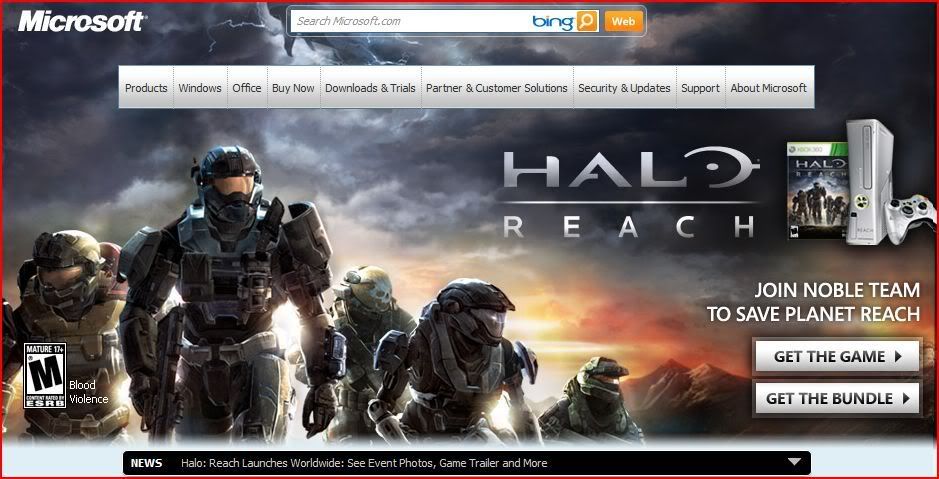
Not only this but you can also check about its launch on the home page of Microsoft. Below is the video link for the exclusive trailer of the game so have a look over it and check out the store too.
Halo: Reach
So why to wait just rush to Microsoft store all you game freaks and Xbox lovers and have the feel of this awesome gaming experience.
[Winners] [Giveaway] Chance to get Ashampoo's Snap 4 licenses worth $19.99
This giveaway was nice and there so many responses on the post. Winners of the giveaway are announced, and we selected 5 winners using Random.org .
Winners are:
willieboy
vhick
sudip kumar das
kenston
Nguyễn Duy Phương
Congrats to all the winners stay tuned to UnlockWindows and will get more exciting offers. Licenses will be sent to your email directly from Ashampoo's executive. Thanks to all for staying in contact.
Winners are:
willieboy
vhick
sudip kumar das
kenston
Nguyễn Duy Phương
Congrats to all the winners stay tuned to UnlockWindows and will get more exciting offers. Licenses will be sent to your email directly from Ashampoo's executive. Thanks to all for staying in contact.
[Giveaway] Chance to get Ashampoo's Snap 4 licenses worth $19.99
In this world of blogging and lots of websites and communities we all need to upload some snaps of our desktop, application, some error messges, dialog box etc. and for that we ned to capture them at right moment and with clarity. We all bothera about that to much and need an intelligent tool with all facilitites and features equipped. For all that there is one solution I came across and wrote about it in my last post "Ashampoo Snap 4: Simply capture everything from your screen."
From today onwards I am starting an interesting giveaway of this amazing well equipped tool worth $19.99 and there is a chance to get 5 free licenses of this tool. For this you have to follow simple steps as stated below:
STEP 1: Subscribe to UnlockWindows Newsletter at no cost( FREE ). You can subscribe to it using the Subscribe link by givng your email id there. or click here.
STEP 2: Leave a meaningful comment here in this topic. Make sure that while leaving comment you must provide the same email id which you use for subscribing to UnlockWindows, otherwise you won't be eligible for this giveaway.
[ Note: Your Subscription must be active, if it is unverified then we'll not consider that email id as valid for the contest. ]
That's it. Winner will be chossen randomly who will get the FULL license of Ashampoo Snap 4.
Best of luck to all...
Subscribe to:
Posts (Atom)
Buy Quick Heal at Cheap Price


Friends


Link to us

BlogAdda

About Me

- Arvind Kumar
- I'm Arvind Kumar from India, B.Tech, now working in a MNC. I love to use Microsoft Products and learn from that. Bill Gates is my ideal person.

